 quoneon
Written guide to one earthquake-waveform workflow. Engineering Signal Processing → Seismic/Geophysical → Earthquake Analysis (engineering_signals/earthquake_analysis, catalog ID TB12-APP01) accepts waveform data and explicit processing metadata. This guide separates a saved CI.CLC demonstration from the current app’s input and export contracts. It adds no new scientific run or recording acceptance.
1. Keep the three components and their source identity
The saved example uses SCEDC station CI.CLC, blank location code --, and channels BHE, BHN, BHZ from 2019-07-06 03:18:30 to 03:23:30 UTC. Obtain the waveform through the SCEDC FDSN dataselect service, using network CI, station CLC, channel pattern BH?, the stated time range and miniSEED format. The provider documents these selection fields. Keep its citation and the exact downloaded file with your results.
The recorded miniSEED is 135,168 bytes; its SHA-256 appears in the source and evidence inventory. A later response from the same query is not assumed byte-identical. The saved contract reports 12,001 samples per component at 40 Hz, with a 0.025-second interval and a first-to-last span of (12001 − 1) / 40 = 300 seconds. This differs from counting each sample as a complete interval.
Open the app and choose LOAD EARTHQUAKE / WAVEFORM for this miniSEED. The current waveform loader requires matching sample rates, lengths and start times, and a common network/station/location for the Z/N/E component set. It does not pad mismatched channels. Channel suffixes supply the component roles; this is not an independent survey of sensor orientation. Inspect the Earthquake Input Contract table before interpreting any result.
2. Preserve instrument counts and missing calibration
This input contains instrument counts. The saved receipt records no response removal, baseline correction, implicit sorting or resampling. Although a table field is named “Acceleration Unit” and package array names contain acceleration, those names do not make counts physical acceleration. Use the recorded unit and processing state.
Choose EDIT SETTINGS / METADATA to inspect the declared settings. Leave calibration and physical-processing assertions unset unless you possess the corresponding evidence. Renaming counts to m/s² or setting a baseline flag does not perform response removal or baseline correction. The app keeps the supplied components and separate demeaned views for methods that require them; the saved “Global Demeaning: false” field does not mean every calculation uses an uncentered signal.
3. Select a bounded set of routes
The saved run selected upload_schema, waveform_quality, triaxial_hodogram, sta_lta_trigger, aic_p_pick, s_arrival_polarization, frequency_spectrum, spectrogram, hv_spectral_ratio and peak_ground_motion. Nine succeeded; peak ground motion was unavailable. The overall receipt is partial, with validated: false. Preserve the route ledger, including the unavailable route.
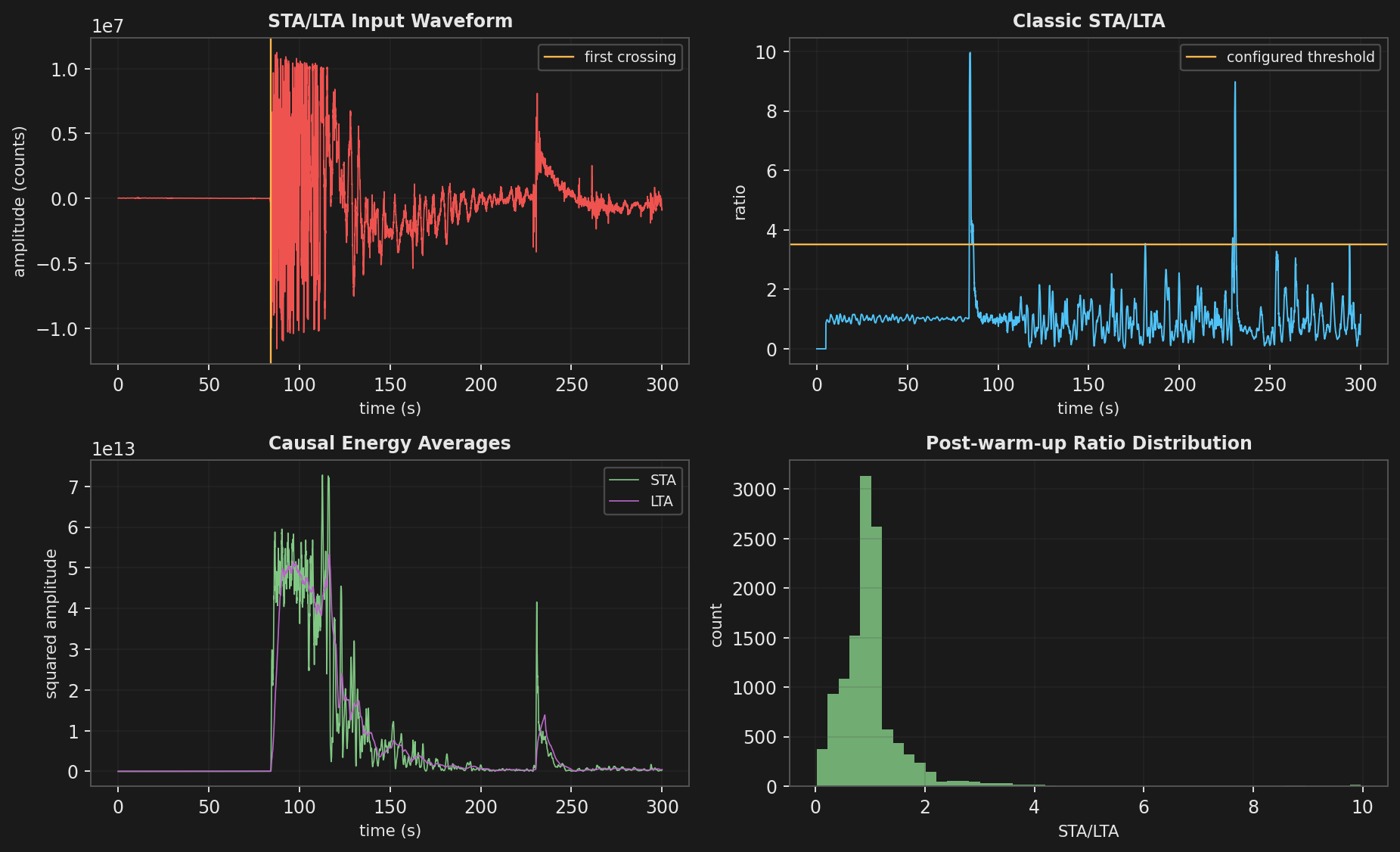
For comparison with this saved example, retain sta_window_s = 0.5, lta_window_s = 5.0, trigger_threshold = 3.5, aic_search_s = null, minimum_s_after_p_s = 0.2, pick_window_s = 1.0 and hvsr_smoothing_octaves = 0.125. No uploaded phase picks are supplied. The stored Welch and STFT segment settings are null; the result tables report their resolved lengths of 2,048 and 256 samples. Record both the requested settings and the resolved values, rather than silently replacing automatic choices.
The current app initially selects all 20 routes. For this bounded example, clear the other routes and retain the checkboxes Input Contract, Waveform Quality, Tri-axial Polarization, STA/LTA Trigger, AIC P Pick, S Polarization, Fourier Spectrum, Time-Frequency, Earthquake H/V and Peak Ground Motion. Apply settings with VALIDATE AND APPLY, then choose RUN and wait for completion before reading the tables or exporting. Keep errors and unavailable outcomes in the receipt; do not treat them as successful measurements.
4. Read candidates, spectra and refusals separately
| Saved result | What to inspect | Interpretation boundary |
|---|---|---|
| STA LTA Trigger | 20-sample STA, 200-sample LTA; first crossing at 84.125 s; peak ratio about 9.964. | An onset candidate measured from record start, not a reviewed phase pick or an event declaration. The ratio uses mean squared, demeaned Z/N/E amplitude. |
| AIC P Pick / S Polarization | AIC minimum index 3,358 gives 83.95 s; the reported S candidate is 84.15 s, a 0.20 s difference. | Automated estimates. The S result lies at the configured minimum delay after P; inspect that constraint before interpreting the interval. These numbers do not establish manually accepted P/S arrivals or source distance. |
| Fourier Spectrum | Periodic-Hann Fourier amplitude and Welch density; 2,048-sample Welch segments, 0.01953125 Hz grid spacing and 20 Hz Nyquist frequency. | Amplitude and density have different scales. Here they derive from counts: amplitude in counts and density in counts²/Hz, not calibrated ground motion. Dominant frequency does not classify an earthquake. |
| Time-Frequency | 256-sample segments, 192-sample overlap, 64-sample hop; 188 frames and 24,252 computed cells. | Reviewed STFT convention in the dated source comparison: PSD-scaled ShortTimeFFT, constant detrending and nonnegative frequency bins; interior bin power is not doubled. The saved table records display decimation [1, 1]; a screenshot alone is not the numerical array. |
| Earthquake H-V | Ratio sqrt((PSD_N + PSD_E)/2) / sqrt(PSD_Z); saved smoothed peak about 2.361 at 3.30078125 Hz. | A dimensionless ratio for this earthquake record, with 0.125-octave smoothing. It does not implement SESAME ambient-noise window selection or certification of a site resonance. |
| Peak ground motion | unavailable: “Route requires explicit evidence: physical, baseline.” | No PGA value is supplied. Preserve this refusal; do not replace it with zero or infer calibration from a plausible-looking trace. |
Waveform quality and tri-axial polarization provide additional screening views. Neither a principal-axis azimuth modulo 180° nor an apparent S–P interval establishes an event location. The ObsPy trigger/picker tutorial explains how window and threshold choices affect triggering; it is methodological context, not a parity test of this app.
5. Save and inspect the native evidence package
The following describes the current source contract; this guide has not executed a new export. After a completed or partial run, choose EXPORT VERIFIED PACKAGE and a new .zip filename in an existing folder. Existing destinations are refused. The app checks the written members against their in-memory bytes and then checks the final package hash. “Verified” here means file integrity, not scientific validation.
- Retain
settings.json,receipt.jsonandtables.json. Read the receipt’s route status and unit metadata alongside the tables. The saved demonstration reports nine figures and ten viewer tables; do not assume one table per successful route or a fixed member count for another run. - Inspect
arrays/time_s.npy, the supplied component arrays and any method arrays present in the package. Velocity or displacement arrays appear only when supplied; their presence is not inferred from counts. Array filenames alone do not establish units or calibration. - Open the PNGs under
figures/and inspect the complete JSON tables outside the app. This package’s native contract supplies JSON tables; it does not promise CSV copies. Some table metrics are formatted strings, so use numeric arrays where supplied and retain the displayed precision elsewhere. - Check every listed member’s byte count and SHA-256 against
manifest.json. Keep the final package hash from the export log separately: the manifest lists the data members, not a hash of itself. The package is explicitly classified as anunvalidated earthquake-analysis evidence package. - Keep the original waveform and its acquisition metadata separately. The package excludes raw source files and source paths, and does not promise a reloadable analysis session. Inspect contents before sharing; omission of paths is not a claim that every identifier has been removed.